

Changing a domain name can feel like reinventing your online presence. Whether it’s driven by a rebrand, expansion, or technical need, a domain migration is a big step with even bigger SEO implications. Done right, it’s an opportunity to strengthen your rankings. Done wrong, it can mean lost traffic, revenue, and search visibility.
If you’re planning to switch domains, speaking with a digital marketing agency before making the move can help protect your online performance.
Why Businesses Change Domain Names
Businesses don’t make this decision lightly. Here are the most common drivers:
- Rebranding: A new name often requires a new domain to match, helping align your website with a refreshed identity and customer perception.
- Mergers and Acquisitions: Combining multiple brands into one cohesive online entity often means retiring old domains and consolidating SEO equity.
- Global Expansion: Moving from a country-specific domain (e.g., .co.za) to a .com can signal international ambitions and make your brand more accessible to a wider audience.
- URL Optimisation: Modern SEO strategies favour shorter, keyword-relevant domain names that are easier for users to remember and for search engines to understand.
- SEO Strategy Reset: Legacy issues—such as toxic backlinks, spam penalties, or years of poor optimisation—can make starting fresh the smartest option.
Changing a domain is a brand statement and a technical milestone—it should always be treated with strategic intent.
How Domain Changes Affect SEO
Domain changes can touch every aspect of your search engine performance:
- Temporary drop in traffic: Google treats the domain as new until it’s fully reindexed, leading to temporary volatility in rankings.
- Loss of link equity: Backlinks are one of the strongest ranking signals. If redirects aren’t handled precisely, link value could be lost.
- Fluctuations in rankings: Algorithms take time to reassess authority and relevance across the new domain structure.
- Disrupted user journey: If page URLs or navigation are altered too drastically, you could frustrate loyal users.
- Tracking complications: Without updating tracking tools correctly, your analytics data could become fragmented.
Google’s Official Position on Domain Changes
Google doesn’t penalise domain changes—but mishandling the process can tank your rankings. Their guidelines stress a few critical points:
- Use 301 permanent redirects for all URLs
- Maintain URL structure when possible
- Avoid removing pages or changing content during the switch
- Notify Google via the Search Console Change of Address tool
The reindexing process is gradual, and recovery depends on how large and complex your site is. A small brochure site might stabilise in a few weeks; an ecommerce or content-heavy site could take months.
The Right Way to Migrate Your Domain
Step-by-Step Pre-Migration Checklist
- Benchmark current rankings, impressions, and organic conversions.
- Crawl and export all URLs using tools like Screaming Frog.
- Identify top-performing pages by traffic and backlinks.
- Create a full redirect map—every old URL must point to an equivalent new one.
- Inform your web, SEO, and marketing teams about the planned timeline.
- Conduct a staging environment test to catch technical errors before go-live.
- Prepare customer communication via email or blog post to explain the change.
Redirect Strategy
Redirects are the heart of a domain migration:
- Use 301 redirects—not 302 or JavaScript redirects
- Avoid wildcard redirects (they’re rarely accurate)
- Prioritise redirecting high-authority pages and backlinks
- Keep redirect chains to a maximum of one step to avoid performance issues
- Maintain the redirects long-term (at least 12–18 months)
Update Internal Architecture
- Update all internal links to reflect the new domain.
- Replace URLs in navigation, footers, and content manually or via CMS tools.
- Update hreflang tags and schema markup if applicable.
- Refresh your sitemap.xml and robots.txt with the new domain references.
Update Search Tools
- Submit the new sitemap to Search Console
- Use the Change of Address tool
- Reconnect your site in Google Analytics
- Monitor crawl errors and validate fixed issues regularly
- Rebuild audiences and goals in Google Ads and social pixels
Domain Migration SEO Checklist
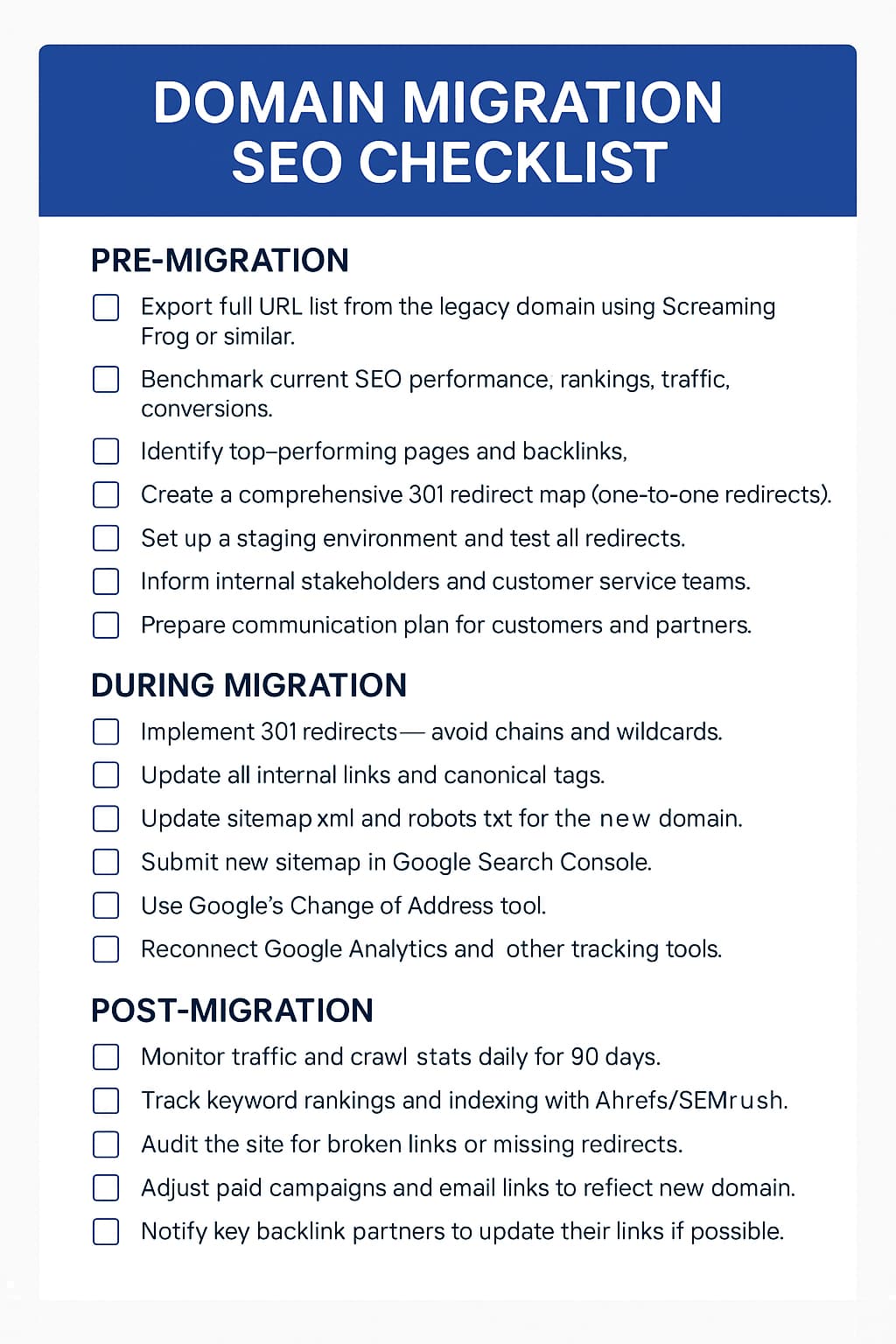
Recommended SEO Tools for Domain Migration
Screaming Frog SEO Spider
Scan and export every page of your site. Use it to verify live redirects and detect broken links.
SEMrush / Ahrefs
Track domain authority, keyword rankings, and competitor performance. Monitor backlink retention post-migration.
Google Search Console
Submit your new sitemap, monitor crawl issues, and signal the domain change to Google.
Google Analytics
Compare behaviour and conversion data pre- and post-migration. Detect anomalies fast.
Sitebulb
Perform a deep SEO health check. Especially useful for visualising redirect chains and orphaned pages.
HubSpot
A powerful platform for combining marketing automation, lead capture, and smart content.
GTmetrix / PageSpeed Insights
Ensure your new domain matches or improves your speed benchmarks.
Majestic
Evaluate trust flow and track link equity movement over time.
Link Redirect Trace
Check that every redirect is functioning properly and efficiently.
Archive.org
Use the Wayback Machine to validate historical URLs and recover lost content.
Real-World Examples of Domain Migration Impact
Positive Example: Moz.com
Moz rebranded from SEOmoz and successfully retained authority and visibility. They carefully controlled redirects, retained top content, and increased brand recognition.
How to Minimise SEO Disruption
- Start with a detailed SEO migration strategy
- Prioritise redirects based on value and volume
- Retain title tags, meta descriptions, and headings wherever possible
- Maintain consistency across URLs, content, and media files
- Be patient—initial ranking drops are common, but recoverable
Long-Term SEO Benefits of a Well-Planned Migration
Done right, a migration can:
- Improve brand recognition and trust
- Simplify site architecture for better indexing
- Eliminate legacy SEO issues
- Unlock growth via a more relevant domain name
- Streamline analytics and ad performance tracking
When You Should (and Shouldn’t) Change Your Domain
Good Reasons to Change
- Brand evolution or repositioning
- Poor legacy SEO performance
- Better top-level domain availability (.com vs .biz)
- Legal or compliance requirements
Reasons to Hold Off
- Lack of technical and strategic resources
- No significant SEO advantage to the new domain
- Risk of confusing loyal users or customers
- Absence of a clear redirect and comms plan
Talk to an SEO Company Before You Move
Changing your domain touches everything from tech stack to content and marketing. Professional SEO support can prevent hidden pitfalls, smooth the transition, and make the most of the opportunity.
Digitlab offers tailored SEO migration services designed to retain rankings, protect visibility, and set your new domain up for growth. Talk to our digital marketing agency to start planning your move.
Keep Your SEO Grounded During Domain Changes
Domain migrations can be daunting, but they don’t have to be destructive. With proper planning, data-driven execution, and the right expertise, you can not only retain your hard-earned SEO—but come back stronger.
The web rewards relevance, trust, and clarity. A domain change—if done with precision—can reinforce all three.